In Airline Management Simulator (AMS), every aircraft comes with multiple predefined cabin layouts, one of which is set as the default. New aircraft are delivered directly from the manufacturer with this default configuration.
You can view all available layouts for any aircraft model in the Aircraft Market by selecting an aircraft and clicking the Cabin Configuration tab.
Understanding Cabin Configurations
Each cabin configuration defines the seating classes and In-Flight Entertainment (IFE) services installed on the aircraft. Most configurations are modeled after real-world airline setups.

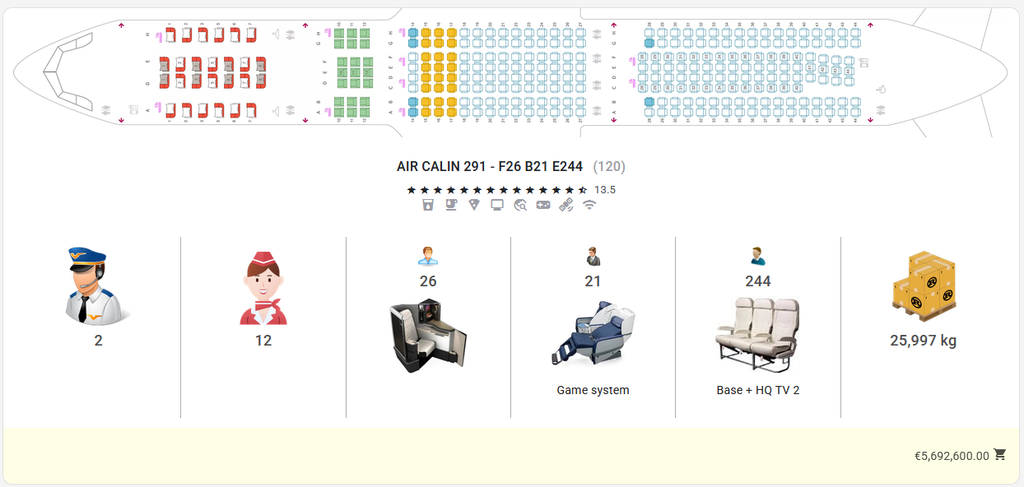
- Layout Title Structure:Configurations are named using the airline that inspired the layout, the total seat count, and a breakdown of classes using standard abbreviations (F for First, B for Business, and E for Economy).
- Example: “Aircalin 291 – F26 B21 E244”This represents a 291-seat layout modeled after Aircalin, configured with 26 First Class, 21 Business Class, and 244 Economy Class seats.
- Key Specifications Included:
- Crew Requirements: Number of pilots and cabin crew required (which determines crew salary expenses).
- Cargo Payload: Maximum available cargo capacity per flight (excluding passenger baggage).
- Amenities & Quality: Installed In-Flight Entertainment (IFE) systems and visual quality icons for the cabin.
- Configuration Cost: Determined by the quality of the seats and installed IFE systems. Luxury layouts with premium services carry a higher purchase price.
How to Change a Cabin Layout
To reconfigure an aircraft, click the Change Cabin Layout icon  on either the Aircraft Information Panel or the Aircraft Details page.
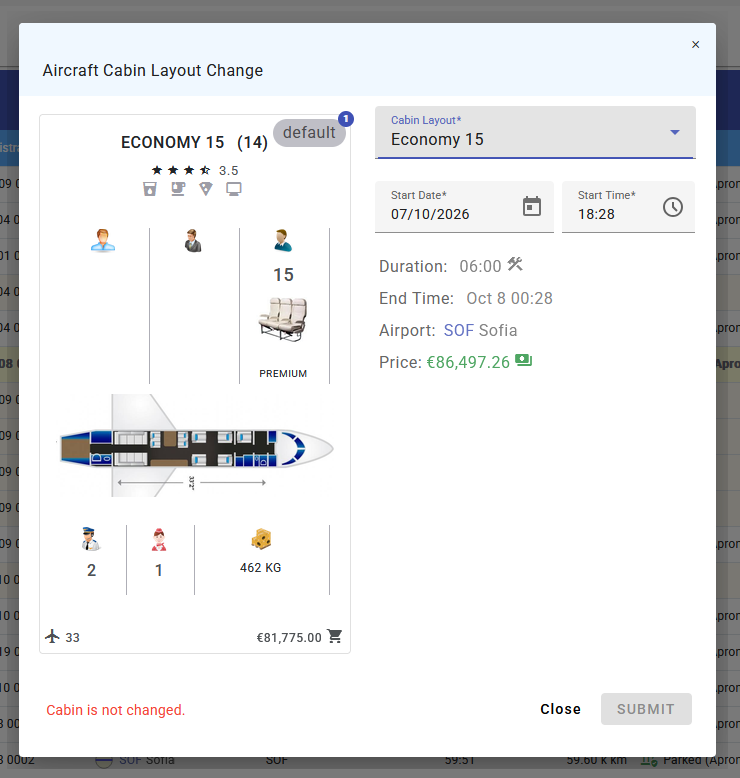
- Select Layout: Choose your target layout from the dropdown menu.
- Schedule Maintenance: Set the start date and time for the reconfiguration work.
- Downtime: Cabin reconfigurations follow standard maintenance rules. Reconfiguration takes several hours (depending on aircraft type), during which time the aircraft is grounded and cannot perform flights. You can flexibly schedule this downtime between existing flights.
- Payment: The reconfiguration cost will be deducted from your company bank account automatically once the work is completed.
Why Should You Change Cabin Layouts?
Reconfiguring your fleet allows you to optimize passenger capture across your network:
When generating multi-leg transfer connections for passengers, the AMS booking engine checks seat class availability across the entire route. If at least one flight in a transfer sequence offers Business or First Class seats, high-yield premium passengers can book tickets for those classes across the itinerary.
To attract higher-yielding First and Business Class passengers to your network, ensure that at least one key flight segment in your transfer connections offers premium seating.
We’d love to hear your feedback! Please leave a comment below if you:
- Have a question about how something works
- Spot a bug in the game
- Have ideas for new features or UI improvements

Leave a Comment